Menu Template:
Red Navigation Buttons - Rounded Corner


 |  |  |
Flash Button Swf
This menu is generated by Vista Flash Menu.
Create your own menu now!

| | |
This menu is generated by Vista Flash Menu.
Create your own menu now!




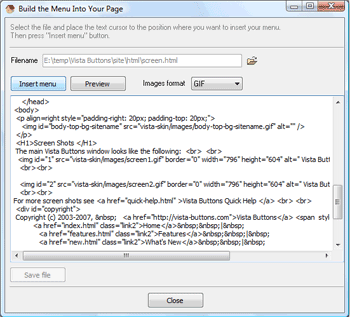
After that, you can edit your code to prepare the page for the menu insertion. Normally, no coding is required. Then set the cursor to the line you want menu code to be inserted to and click the "Insert" button. The menu code will be inserted into the page. Then you can either save the page or close the dialog without saving by clicking "Save" or "Close" buttons.
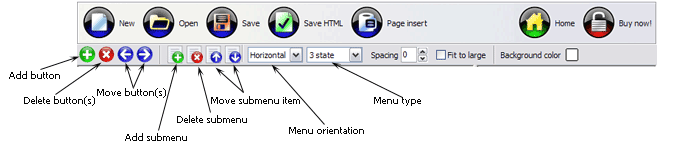
Add button - to add website buttons to the menu.
Delete button(s) - to delete selected button(s). Is inactive if no button is selected.
Move button(s) - to change selected button's order in the menu. Selected button(s) will be moved one position left/right each time you click one of the Move buttons.
Add submenu's item - to add submenu's item to the menu. Is inactive if no button is selected.
Delete button(s) - to delete selected submenu item(s). Is inactive if no button is selected.
Move submenu's item - to change selected submenu's item order in the menu. Selected item(s) will be moved one position up/down each time you click one of the submenu's item.
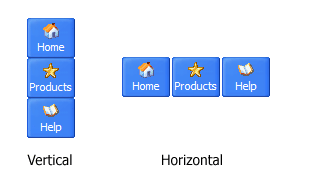
Menu orientation - to select menu orientation (vertical or horizontal). In vertical menu all website buttons are arranged in a column and have the same width. If the menu is horizontal then all its buttons are arranged in a row and have the same height.
Menu type - to select menu type (1-state, 2-state, 3-state and 3-state toggle).
1-state buttons are simple static image buttons.
2-state buttons respond to mouseOver event creating rollover effect. Mouse click doesn't change the button appearance.
2-state buttons respond to mouseOver event creating rollover effect. Mouse click doesn't change the button appearance.
3-state buttons support both mouseOver and mouseClick event.
3-state toggle buttons additionally stick in the pressed state after a click.
Spacing - to add space between all buttons.
Fit to large - to make all the menu buttons have the same size. The size will be automatically set to accommodate the biggest text and/or icon in the menu.
Background color - click the square to select Work area's background color.
 (please include template name in the message title)